2009-05-21

Random Python snippets

Lists and dictionaries

Given a flat list, like [key1, value1, key2, value2] convert it to an alist or dictionary:
>>> toalist = lambda kvs: zip(kvs[0::2], kvs[1::2])
>>> toalist(range(4))
[(0, 1), (2, 3)]
>>> dict(toalist(range(4)))
{0: 1, 2: 3}
Convert a dictionary to a flat list:
>>> # dict to alist
... al = list({1:2,3:4}.iteritems())
>>> al
[(1, 2), (3, 4)]
>>> # alist to flat list
... reduce(lambda acc,t: acc + list(t), al, [])
[1, 2, 3, 4]
To tranpose a list of lists/tuples unpack as a list of function arguments and zip zip(*mylist):
>>> l = list(enumerate("abcdef"))
>>> l
[(0, 'a'), (1, 'b'), (2, 'c'), (3, 'd'), (4, 'e'), (5, 'f')]
>>> # transpose list of lists/tuples
... zip(*l)
[(0, 1, 2, 3, 4, 5), ('a', 'b', 'c', 'd', 'e', 'f')]
>>> # once again
... zip(*_)
[(0, 'a'), (1, 'b'), (2, 'c'), (3, 'd'), (4, 'e'), (5, 'f')]
Flatten a list of lists:
>>> lofl = [[1,2], [3], [4,5]]
>>> import operator
>>> reduce(operator.add, lofl)
[1, 2, 3, 4, 5]
An alternative approach is to use chain from itertools (this works also on huge lists if used wisely!):
>>> list(itertools.chain(*lofl))
[1, 2, 3, 4]
Apply a function to either an iterable (list, tuple) or a scalar:
>> def fmap(f,xs):
...   try: return map(f,xs)
...   except TypeError: return f(xs)
... 
>>> fmap(lambda x:x*x, range(5))
[0, 1, 4, 9, 16]
>>> fmap(lambda x:x*x, 5)
25

Strings and Unicode

Unicode stuff is changing in 3.0. For earlier versions, it is important to distinguish strings ("abc") and unicode strings (u"abc"). The former can be converted to the latter with unicode():
>>> "абв"
'\xd0\xb0\xd0\xb1\xd0\xb2'
>>> u"абв"
u'\u0430\u0431\u0432'
>>> unicode("абв","utf8")
u'\u0430\u0431\u0432'
Please note there are 3 unicode symbols in the original literal and there are three values in the unicode string. This is how the strings are to be represented internally. Any communication with an external world usually requires that unicode data is encoded. There are various encodings, "UTF-8" is one of the most common. Any encoded input should be decoded to be processed:
>>> "абв".decode("utf8")
u'\u0430\u0431\u0432'
>>> u"абв".encode("utf8")
'\xd0\xb0\xd0\xb1\xd0\xb2'
To live a long and happy life it is important to understand if you are working with an encoded data (practically binary data) or decoded unicode text. To test if an object is a string (either ascii string or unicode), test if it is an instance of basestring:
>>> isinstance("abc",basestring)
True
>>> isinstance(u"abc",basestring)
True
>>> isinstance(42,basestring)
False
To convert to a string and from string (depends on type):
>>> str(42)
'42'
>>> unicode(42)
u'42'
>>> int("42")
42
>>> float("42")
42.0

Backporting to Python 2.4

With Python 2.5, 2.6 and even 3.0 around, I still need to make some scripts run with Python 2.4. Just two tricks, to make sqlite3 code work:
try:
   import sqlite3
except:
   from pysqlite2 import dbapi2 as sqlite3 # cheating with py2.4
and to make ElementTree work:
try:
        import xml.etree.ElementTree as ET
except:
        import cElementTree as ET  # not xml.etree in py2.4, use celementtree

2009-02-23

epi2fox: import Epiphany bookmarks into Firefox 3

I used Epiphany as my main browser for a long time because I find its bookmarks system much better than anything else. However, as new Firefox 3 permits tagged bookmarks too, I decided to give it a try once again. But I wanted all my bookmarks from Epiphany available in Firefox too. With the same tags.

I didn't find any ready solution, so I wrote a script, epi2fox.py. Assuming, you have an almost empty Firefox profile, run this script like this:

$ epi2fox.py ~/.mozilla/firefox/yourprofile/places.sqlite
The script is not perfect, but it did the job. One of its major shortcomings: while Epiphany permits multiple bookmarks for the same URL, Firefox does not. Probably, such bookmarks should be merged on importing, but the script just throws away duplicates (and prints error messages).

Links:

PS. Please backup your places.sqlite before running the script.

2009-01-28

rss2xmpp, a script to crosspost any feed to Jabber

Usage:
$ rss2xmpp.py feed-URL your-jabber-id
On the first run the script will complain that you have to put jabber settings in ~/.rss2xmpp. It writes an example for GoogleTalk there. Either RSS or Atom feeds should work.

Requirements: FeedParser, html2text, and xmpppy, and Python, of course.

The script itself is in the BitBucket: rss2xmpp.py.

BTW, I discovered, that BitBucket not only provides free OpenSource hosting for mercurial repositories, but has free SSH access and allows one private repository per account.

See also:

Скрипт rss2xmpp, кросспост чего угодно в Jabber (this post in Russian)

2008-09-22

Python inside LaTeX (and Sage too)

I discovered recently, that it is possible to run Python scripts from LaTeX documents and use the to generate document's content. This can be used to read/convert data, generate tables and figures, do on-the-fly calculations.

How to run Python code from LaTeX:

  • download python.sty. Put it in the same directory as the LaTeX document
  • \usepackage{python}
  • Put Python code inside \begin{python}\end{python} environment. Whatever this code prints, will become part of the LaTeX document.
  • Run LaTeX with -shell-escape option (this permits running external code from LaTeX)
This is an example of the LaTeX document and the PDF produced.

And some more advanced examples are in this LaTeX file (see also the PDF). They cover symbolic calculations from inside LaTeX, plotting and variable persistence between python environments.

P.S. What's more, one can even embed the full-featured symbolic math package Sage into LaTeX. For this purpose use sagetex package. By the way, you do not need to install Sage to start using it, please check out its web-version. It is really powerful.

Links:

This post in Russian: Python внутри LaTeX (и математический пакет Sage тоже)

Visualizing altitude and velocity profiles of GPS tracks

I think that altitude and velocity profiles of GPS tracks is one of the most intereseting forms of their representation. One can use gpsvisualizer.com to plot such profiles. However, I prefer having free tools for such a simple thing.

Here I offer my own python script gpxplot, which extracts profile data from a GPX file and plots a profile. This is a direct link: gpxplot.py.

There are two important features of the script:

1) GPX file may consist of two or more separate tracks. Each track may consist of several disconnected segments. The script preserves this segmentation of the track.

2) GPX files do not contain explicit information about distane travelled. The script calculcates it using haversine formula (as if the Earth were spherical).

The script can either output profile data in a convinient tabular form, or generate a gnuplot script and call gnuplot to do actual plotting.

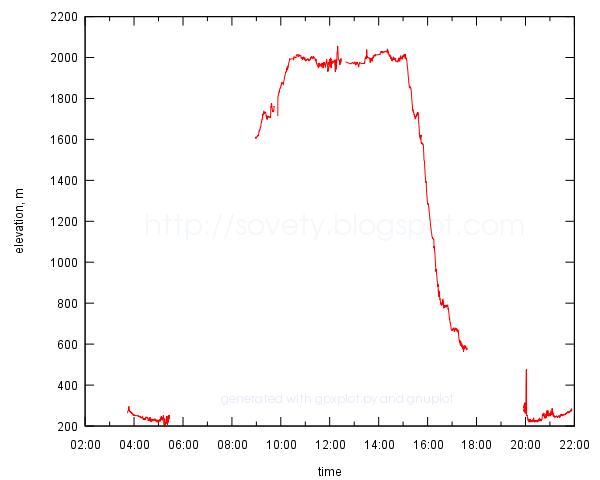
Usage examples are given on a Google Code page. This is what a result may look like:
example of a time-altitude profile plotted to SVG file with gnuplot

Update: Now there is also online version of the script. Just upload a track and embed the plot in whatever page you want.

Links:

This announcement in Russian: Визуализация профилей высоты и скорости GPS-треков

2008-07-15

Auto-building LaTeX documents with SCons

How many commands does it take to compile LaTeX document?
1. pdflatex mypaper.tex
2. bibtex mypaper
3. pdflatex mypaper.tex
4. pdflatex mypaper.tex
— and how many times do you have to type them when you edit an article? A lot.

Fortunately, there is a simple cure. A SCons build system. Install it and create a new SConstruct file where the LaTeX document lives, with a contents like this:

PDF(target = 'mypaper.pdf', source = 'mypaper.tex')
Then just run
$ scons
And SCons will automatically run bibtex if you use it, it will run PDFLaTeX as many times as it needs (SCons is smart enough to read the log file of the LaTeX), SCons will remember MD5 sum of the source file and will avoid re-compiling the PDF if the source file did not change. Very convenient!

I also prefer to re-build the PDF whenever I change any of the figures. Given that my figures are in imgs/ subfolder and all are either *.pdf or *.png files, I can create a list of “source” files using SCons' Glob function. This is what SContstruct then looks like:

src_list = [ 'mypaper.tex', Glob('imgs/*.pdf'), Glob('imgs/*.png') ]
PDF(target = 'mypaper.pdf', source = src_list)
Of cource, one can still use make to compile LaTeX documents. This is a good Makefile for a start.

This post in Russian: Автоматическая компиляция документов LaTeX

2008-06-09

antiodt: view OpenOffice documents as plain text

I don't like launching heavy office applications just to read a file. And there are antiword and wv to read MSWord *.doc files, unrtf to read RTF, and pdftotext to read PDF. Only open, ISO standard, ODT (OpenDocument, produced by OpenOffice) cannot be read that way. o3read seems to be useless for the new ODT files.

So, this is a one-and-half-line script I use to view OpenOffice files quickly from the shell prompt (antiodt):

#!/bin/sh
unzip -p "$1" content.xml | \
xmlstarlet sel -N text="urn:oasis:names:tc:opendocument:xmlns:text:1.0" \
  -T -t -m '//text:p' -v . -n | less
Any ODT is just a normal ZIP archive with an XML file with all the contents. I used xmlstarlet to extract text paragraphs from that XML. Certainly, all formatting is lost, but it is fast.:
$ antiodt document.odt
I got an idea from here.

Update 2009-09-23: To convert ODT to plain text and preserve some formatting, use odt2txt.py script. It converts ODT to Markdown.

This post in Russian: antiodt: просмотр документов OpenOffice в виде простого текста