Showing posts with label script. Show all posts

2010-11-25

Unplot.py: from plots to tabular data

Recently, when doing backups, I noticed a script on my hard drive, which I think may be useful to someone else. It takes an image with a line plot and generates a data file for that plot. So it does an operation inverse to plotting, i.e. unplotting.

Download: unplot.py.

The script is available on bitbucket. Feel free to improve.

To run the script, you first need to decide which part of the plot image you want to scan, and what values the pixels correspond to. I prefer to use Gimp or Geeqie to find pixel coordinates.

If there are many lines on the same plot, You may also decide to colourize the line you are interested in with some distinct colour. Use Gimp if necessary. Write down the colour's HTML code.

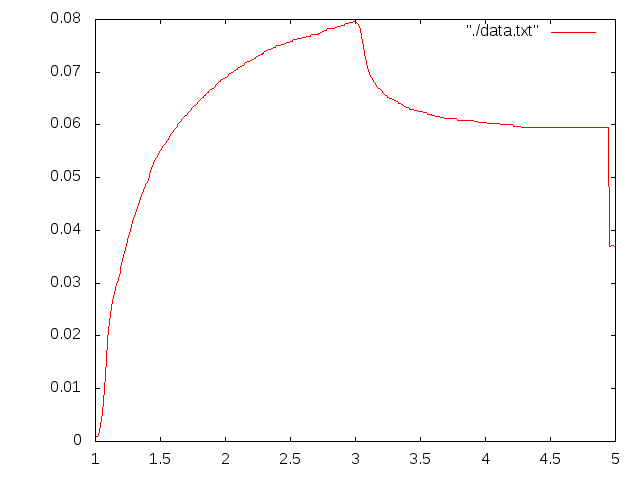
This plot is a good point to start:

colourized plot

Then you can run the script against it. In the directory with the script, run:

./unplot.py "#00ff00" 0 151 0 475 5.0 824 0.09 85 /path/to/plot.png > /path/to/data.txt

The first parameter is the HTML colour code of the line to select. Then there is the values and the pixel coordinate of the bottom left corner of the plot: X value, X pixel coordinate, Y value, Y pixel coordinate. Then the same for the top right angle. And finally the name of the file with the plot. The output is redirected to the text file. Please note that the origin of digital images is usually the top left corner.

After running the script try plotting the data once again to make sure you selected the right colour and region. I went too far to the right in this example and the green letters were mistaken for the part of the plot.
In Russian: unplot.py: извлекаем табличные данные из графиков.

2009-08-26

Monitor file changes in a shell script

Problem: monitor file changes from a shell script and execute some commands when necessary. For example, rebuild LaTeX document or compile program every time when one of its source files is changed.

Solution: inotify-tools help to monitor file changes. There are two utilities. The first one, inotifywait, blocks and waits for changes, then returns. If the event it was waiting for happened, its return code is 0 (success). See an example of using inotifywait below. The second utility is inotifywatch, it monitors files' changes, collects information and prints a nice table on exit. Please visit inotify-tools' site to see examples of its use.

Example: inotifywait monitors all *.tex and *.bib files in the current directory, and when any of them changes, it runs pdfLaTeX and BibTeX to rebuild document:

while true ; do \
  inotifywait *.tex *.bib \
  && ( pdflatex -interaction=nonstopmode mypaper && \
       bibtex mypaper && \
       pdflatex -interaction=nonstopmode mypaper ) \
done

P.S. Please note that when we run LaTeX with -interaction=nonstopmode, it does not ask questions on errors but we can still see those errors.

P.P.S. inotify-tools run only on Linux. You may need to use pnotify or kqueue on *BSD.

Прочесть по-русски

2009-02-23

epi2fox: import Epiphany bookmarks into Firefox 3

I used Epiphany as my main browser for a long time because I find its bookmarks system much better than anything else. However, as new Firefox 3 permits tagged bookmarks too, I decided to give it a try once again. But I wanted all my bookmarks from Epiphany available in Firefox too. With the same tags.

I didn't find any ready solution, so I wrote a script, epi2fox.py. Assuming, you have an almost empty Firefox profile, run this script like this:

$ epi2fox.py ~/.mozilla/firefox/yourprofile/places.sqlite
The script is not perfect, but it did the job. One of its major shortcomings: while Epiphany permits multiple bookmarks for the same URL, Firefox does not. Probably, such bookmarks should be merged on importing, but the script just throws away duplicates (and prints error messages).

Links:

PS. Please backup your places.sqlite before running the script.

2009-01-28

rss2xmpp, a script to crosspost any feed to Jabber

Usage:
$ rss2xmpp.py feed-URL your-jabber-id
On the first run the script will complain that you have to put jabber settings in ~/.rss2xmpp. It writes an example for GoogleTalk there. Either RSS or Atom feeds should work.

Requirements: FeedParser, html2text, and xmpppy, and Python, of course.

The script itself is in the BitBucket: rss2xmpp.py.

BTW, I discovered, that BitBucket not only provides free OpenSource hosting for mercurial repositories, but has free SSH access and allows one private repository per account.

See also:

Скрипт rss2xmpp, кросспост чего угодно в Jabber (this post in Russian)

2008-09-22

Visualizing altitude and velocity profiles of GPS tracks

I think that altitude and velocity profiles of GPS tracks is one of the most intereseting forms of their representation. One can use gpsvisualizer.com to plot such profiles. However, I prefer having free tools for such a simple thing.

Here I offer my own python script gpxplot, which extracts profile data from a GPX file and plots a profile. This is a direct link: gpxplot.py.

There are two important features of the script:

1) GPX file may consist of two or more separate tracks. Each track may consist of several disconnected segments. The script preserves this segmentation of the track.

2) GPX files do not contain explicit information about distane travelled. The script calculcates it using haversine formula (as if the Earth were spherical).

The script can either output profile data in a convinient tabular form, or generate a gnuplot script and call gnuplot to do actual plotting.

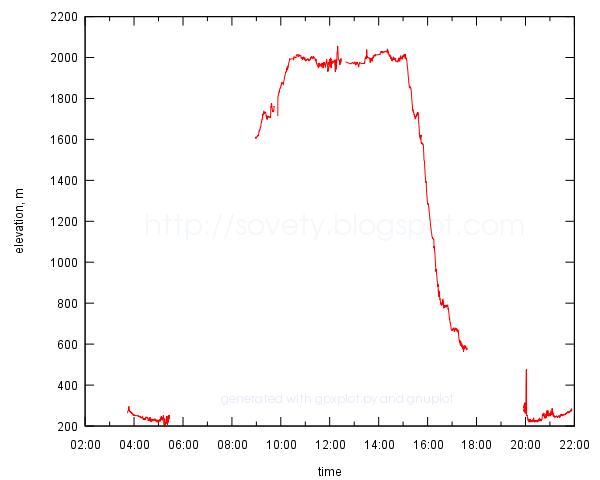
Usage examples are given on a Google Code page. This is what a result may look like:
example of a time-altitude profile plotted to SVG file with gnuplot

Update: Now there is also online version of the script. Just upload a track and embed the plot in whatever page you want.

Links:

This announcement in Russian: Визуализация профилей высоты и скорости GPS-треков

2008-06-09

antiodt: view OpenOffice documents as plain text

I don't like launching heavy office applications just to read a file. And there are antiword and wv to read MSWord *.doc files, unrtf to read RTF, and pdftotext to read PDF. Only open, ISO standard, ODT (OpenDocument, produced by OpenOffice) cannot be read that way. o3read seems to be useless for the new ODT files.

So, this is a one-and-half-line script I use to view OpenOffice files quickly from the shell prompt (antiodt):

#!/bin/sh
unzip -p "$1" content.xml | \
xmlstarlet sel -N text="urn:oasis:names:tc:opendocument:xmlns:text:1.0" \
  -T -t -m '//text:p' -v . -n | less
Any ODT is just a normal ZIP archive with an XML file with all the contents. I used xmlstarlet to extract text paragraphs from that XML. Certainly, all formatting is lost, but it is fast.:
$ antiodt document.odt
I got an idea from here.

Update 2009-09-23: To convert ODT to plain text and preserve some formatting, use odt2txt.py script. It converts ODT to Markdown.

This post in Russian: antiodt: просмотр документов OpenOffice в виде простого текста