2011-06-23

Steepness of a* and b* channels in Darktable

As many aspiring photogrpahers, I want to adjust color curves in Lab color space. Changing steepness of a* and b* curves is a popular method to boost color contrast in the image (see Dan Margulis books or this summary). It works best for abstract and some of the landscape photography.

There are few open source solutions which allow to do it. Gimp can decompose an image into three Lab layers, but it doesn't have an interactive preview, and internally Gimp represents color with only 8 bits per channel. There are also Delaboratory and Lab curves for Gimp, but they don't fit my workflow very well.

These days I do almost all my photo processing in Darktable, and wanted to be able to adjust color contrast there without using another program (Delaboratory) everytime. I knew that Darktable uses floating point representation for color channels and works in Lab already. Then I noticed, that basic Margulis' recipes are about “straight” symmetric curves anyway. So if there are only two degrees of freedom, then even a simple plugin with two sliders can be very useful. And so wrote my first plugin for Darktable, and named it “Color contrast”.

This plugin allows to control the effect with only two sliders. They have user-friendly labels “green vs magenta” and “blue vs yellow”. So this plugin can be used even by users who do not know anything about Lab. Technically, two values which the sliders control are the tangents of straight symmetric curves for the transforms in a* and b* channels respectively.

An original image in Darktable:

Darktable: before Color Contrast

And after applying Color Contrast plugin:

Darktable: after Color Contrast

Update: The plugin has been pushed to master branch of the Darktable git. See how to install it.

The plugin should appear in post-0.9 branch of Darktable after the release of 0.9; and I hope it gets accepted for the main line. In the meanwhile you may apply these two patches over master:

0001-colorcontrast-change-steepness-of-a-and-b-curves.patch

0002-colorcontrast-clip-a-and-b-channels-reload_defaults.patch

Or you may get the patches from the (rebasing) branch custom of my git repository: darktable-custom.

2011-06-14

Jumping to correct tags in Emacs (and in Vim)

I use Emacs to edit Python code, and navigate the code using ETags and find-tag (M-.) function. However, I noticed, that if some modules use imports like from x import foo, then sometimes (find-tag "tagname") jumps to some random file which imports a tagname, rather than to a file where tagname is defined.

I was very frustrated. Initially I thought it was a bug in etags. It appears that it is a feature. Fortunately, there is a solution which allows to find the symbol definition (scroll down to the end of the post if impatient).

Example

This is an example which reproduces the problem. Let's suppose I have three files. A.py:

from x import foo
from y import bar
    
if __name__ == "__main__":
    foo()
    bar()

x.py:

def foo():
    print "foo"

and y.py:

def bar():
    print "bar"

Then if I generate a TAGS file as

$ etags *.py
this is what it will look like:
^L
A.py,53
from x import foo^?foo^A1,0
from y import bar^?bar^A2,18
^L
x.py,19
def foo():^?foo^A1,0
^L
y.py,19
def bar():^?bar^A1,0

Now (find-tag "foo") (M-. upon foo) jumps to A.py, rather than to x.py. The problem manifests when the filename of the module using a symbol precedes alphabetically the filename of the module where the symbol is defined, but in the first place the problem is that import lines are indexed as symbol definitions.

Solution

Initially I thought it is a bug in etags, but now I think that it is a designed behaviour, though not very user-friendly.

If we see help for find-tag function, we may notice, that it has an optional next-p parameter:

(find-tag tagname &optional next-p regexp-p)

Find tag (in current tags table) whose name contains tagname.
Select the buffer containing the tag's definition, and move point there.
The default for tagname is the expression in the buffer around or before point.

If second arg next-p is t (interactively, with prefix arg), search for
another tag that matches the last tagname or regexp used.  When there are
multiple matches for a tag, more exact matches are found first.  If next-p
is the atom `-' (interactively, with prefix arg that is a negative number
or just M--), pop back to the previous tag gone to.

So, it is possible to cycle through all the positions where the tag was found by pressing M-1 M-. or Ctrl-u M-.. To cycle back, M-- M-1 M-..

I don't think it is the best solution usability-wise. While there is some value in having import positions indexed too, I'd prefer to jump always to the definition first, rather than to a random import statement. Also, the default keyboard bindings are not very ergonomic, but at least they allow to find the definition and don't require to install anything special.

P.S. Vim and ctags are affected too. To jump to the second entry of the tag, use 2 Ctrl-] rather than Ctrl-].

2011-03-09

How to choose a Haskell array library

Choosing an array type in Haskell is a difficult task. For one-dimensional random access data structure the vector library seems to be the optimal choice most of the time. Things are more complicated if you happen to need two- or multi-dimensional arrays (matrices), access their blocks and slices as first-class structures (like in Python), enjoy destructive updates, use some linear algebra, interoperate with C and run your code in parallel...

I've reviewed what array libraries are available on Hackage, and compiled this feature matrix.

It is not complete and not finished, please let me know if I am mistaken about some of the libraries.

Data.Array and its variants from the array library seem to be the standard choice of multi-dimensional arrays for a Haskeller. They are not good anymore when you need to write array-to-array operations, access their blocks and slices, or need some linear algebra in general. Choosing the right variant is another question.

Data.Vector from the vector library is fast and has very nice API. It is going to become part of the Haskell Platform. Unfortunately, it is not usable for multi-dimensional arrays, and it doesn't support slices (strides). Only boxed variant is parallelizable.

Data.Packed.Vector and Data.Packed.Matrix from the hmatrix library provide a very nice API, and can do almost anything, if all you need is at most two-dimensional array (a matrix). A big warning sign: hmatrix is GPL. Not a sensible LGPL, but the poisonous GPL library. Also, Data.Packed.Vector and Data.Packed.Matrix are not parallelizable as far as I can see.

Data.Vector.*, Data.Matrix.* and Data.Tensor.* from the blas library. They can do all the standard linear algebra which the BLAS level 3 can offer. Their API is designed with BLAS API in mind. I didn't check if they are interoperable with C arrays, or if the elements are unboxed, or if the operations are parallelizable. The last release was in January 2009, it is not buildable on new GHC 7 yet.

Finally, there is new Data.Array.Repa arrays from the repa library. Nice thing about them: they are designed for parallelization. Not so nice thing about them: they don't give performance advantages on GHC 6, and are not yet buildable on GHC 7. Some more important limitations of the repa: no access to strides or array blocks, no built-in linear algebra, no interoperability with C.

I didn't include in the table Vec and vect libraries, which provide special case solutions in the low-dimension arrays and low-rank matrices. They are mostly tailored towards computer graphics.

2011-01-24

Pro Git book in ePub

I've followed Pandoc instructions, and built a e-book version of Pro Git book by Scott Chacon. If you do not want to repeat these steps yourself, you can download the result:

Scott Chacon. Pro Git. [EPUB]

Scott Chacon. Pro Git. [EPUB] (alternative link)

P.S. The author kindly asks to purchase a paper version of the book to encourage more authors and publishers to use Creative Commons licenses.

2010-11-25

Unplot.py: from plots to tabular data

Recently, when doing backups, I noticed a script on my hard drive, which I think may be useful to someone else. It takes an image with a line plot and generates a data file for that plot. So it does an operation inverse to plotting, i.e. unplotting.

Download: unplot.py.

The script is available on bitbucket. Feel free to improve.

To run the script, you first need to decide which part of the plot image you want to scan, and what values the pixels correspond to. I prefer to use Gimp or Geeqie to find pixel coordinates.

If there are many lines on the same plot, You may also decide to colourize the line you are interested in with some distinct colour. Use Gimp if necessary. Write down the colour's HTML code.

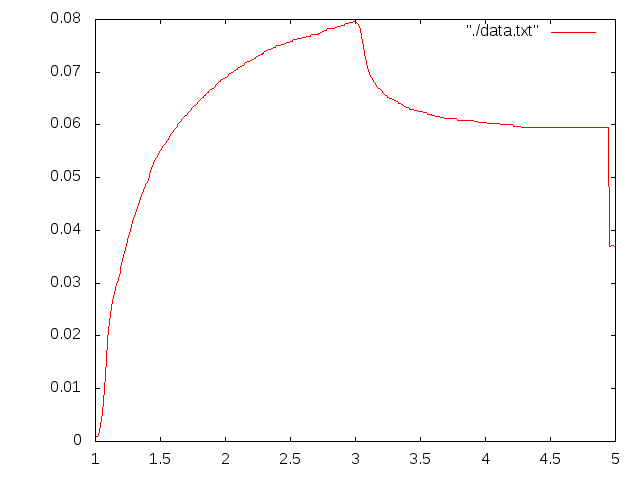
This plot is a good point to start:

colourized plot

Then you can run the script against it. In the directory with the script, run:

./unplot.py "#00ff00" 0 151 0 475 5.0 824 0.09 85 /path/to/plot.png > /path/to/data.txt

The first parameter is the HTML colour code of the line to select. Then there is the values and the pixel coordinate of the bottom left corner of the plot: X value, X pixel coordinate, Y value, Y pixel coordinate. Then the same for the top right angle. And finally the name of the file with the plot. The output is redirected to the text file. Please note that the origin of digital images is usually the top left corner.

After running the script try plotting the data once again to make sure you selected the right colour and region. I went too far to the right in this example and the green letters were mistaken for the part of the plot.

In Russian: unplot.py: извлекаем табличные данные из графиков.

2010-11-11

How to select a region by intensity range in Gimp?

I wrote this as an answer to Photo.StackExchange question, how to select by histogram range in Gimp.

Step-by-step

  1. Make a copy of the layer (Layer → Duplicate Layer)
  2. Select the duplicate layer, apply threshold (Colors → Threshold) to select the range of intensities.
  3. In Layer → Mask → Add Layer Mask (or right click in the list of layers). Select “Grayscale copy of layer” and “Invert mask”.
  4. idem: Mask to selection.
  5. Hide or remove the layer with mask.

An example:

An original image. I want to select the circle:

Original image

Make a copy of the layer:

Duplicate layer

Apply threshold. Note that the area to be selected is black:

Threshold

Add Layer Mask using the grayscale value of the image:

Add Layer Mask

Now you've obtained an image with the mask. Everything except the black circle is transparent (we can see the bottom layer through it):

Image with the mask

Convert the mask to selection. Switch to the original layer. The circle is selected.

Mask to selection

2010-09-14

JavaScript highlighter for Haskell code

In this and in my other Blogspot blog I use SHJS to highlight syntax in Haskell snippets. SHJS is a JavaScript highlighter which uses language definitions from GNU Source-highlight.

To use it, you need to put online:

You may wish to download more than one language definition and concatenate all JavaScript files together. It's OK

Then put this somewhere in the <head>:

<head>
...
<script type="text/javascript" src="http://example.com/path/to/sh_main.min.js"></script>
<script type="text/javascript" src="http://example.com/path/to/sh_haskell.min.js"></script>
<link type="text/css" rel="stylesheet" href="http://example.com/path/to/stylesheet.css">
...
</head>

And add a callback to documents' body element:

<body onload="sh_highlightDocument();">

Finally, wrap your Haskell snippets with <pre class="sh_haskell"></pre>. This is how it looks:

-- Fibonacci numbers
fibs :: [Int]
fibs = 0 : 1 : zipWith (+) fibs (tail fibs)

As far as I know, Haskell language definition has already found its way to GNU Source-highlight, but the corresponding file is not yet shipped with SHJS. So you can download it either from my source repository, or generate from the language definition file (haskell.lang) yourself.

Haskell is a quirky language to highlight, but this language definition handles it reasonably well, better than the current google-code-prettify, and much better than the current GeSHi highlighter.

Update, 2011-01-25: Suprisingly, this highlighter is still better than more recent highlight.js and an alternative language definition for SHJS by Nicolas Wu (zenzike).

So this is the complete list of JavaScript highlighters for Haskell which I know about:

Typography keyboard layout in Linux

From a Russian blog Slovomania I learned that in the new versions of X11 there is a typography layout option, similar to Ilya Birman layout. This is its Linux counterpart:

Typography layout in Linux

To enable it in GNOME: SystemPreferencesKeyboard. Then Layouts tab, Options.... Enable Key to choose 3rd level (right Alt will do) and Enable extra typographic characters under Miscellaneous compatibility options.

Also in Russian: Типографская раскладка в Линуксе.

2010-09-04

LibZip 0.1: read and write zip archives from Haskell

I am happy to present a major release of my Haskell bindings to libzip library, to manipulate zip archives. It took me longer than I initially expected, but finally I like the result. Essential links first:

Hackage page Source repository Documentation Test coverage report An example

What's new

LibZip 0.1 is a complete remake. Under the hood it was made with bindings-DSL instead of C2Hs as before. The new LibZip offers a lot:

  • Support of almost all features of libzip: creating, reading, updating, renaming, and deleting files in zip archives, reading and writing file and archive comments. (LibZip 0.0 was read-only)
  • Support of various data sources: supply contents of a file from a list, from a file on disk, from a file in another archive, or even from a Haskell function.
  • A new monadic interface. It takes care of managing handlers and pointers behind the scenes. Less to type, less space for a user error.
  • Unit tests, better documentation and examples.

LibZip the only non-GPL library for Haskell to deal with zip archives. It is also fast to deal with large on-disk archives (more about it below).

Users of LibZip 0.0 (all 1.5 of them) may still use the old API by importing Codec.Archive.LibZip.LegacyZeroZero instead of Codec.Archive.LibZip. However, the old API is deprecated and will not be supported in the future.

LibZip vs zip-archive

There is another Haskell library to deal with zip archives, namely zip-archive. And here are the differences:

LibZip 0.1/libzipZip-Archive 0.1
LicenseBSDGPL v.2
Pure?NoYes
Large on-disk archivesFastSlow

Few notes about the last line. This is the actual reason why LibZip exists. Zip-archive was unacceptably memory-hungry and slow when dealing with large archives. So I started working on LibZip. I suppose that the problem with zip-archive is that it works with lazy bytestrings, not files. Bytestrings are sequential and don't have fseek. There is no reliable way to implement random access.

To get an idea what's the problem, get some moderately sized zip-archive off the web (for example, this one, 22 MiB), and print the list of files using both libraries.

With zip-archive, I used this code:

import Codec.Archive.Zip
import Control.Monad (liftM)
import System.Environment (getArgs)
import qualified Data.ByteString.Lazy as BS

main = mapM_ list =<< getArgs

list file = do
  a <- toArchive `liftM` BS.readFile file
  mapM_ print $ filesInArchive a

On my laptop, it takes 3.5 seconds to run against the downloaded archive:

$ time ./zip-archive-ls pak128-1.4.6--102.2.zip > /dev/null

real 0m3.499s
user 0m3.430s
sys 0m0.050s

And this is the code using LibZip:

import Codec.Archive.LibZip
import System.Environment (getArgs)

main = mapM_ list =<< getArgs

list file =
    withArchive [] file $ do
      names <- fileNames []
      lift $ mapM_ print names

It takes 0.05  seconds on the same file:

$ time ./libzip-ls pak128-1.4.6--102.2.zip > /dev/null

real 0m0.051s
user 0m0.040s
sys 0m0.010s

The difference gets more dramatic as the size of the archive increases. So, in my opinion, license issues aside, LibZip is a better choice when dealing with large archives on disk. Zip-archive may be more suitable choice to generate small archives in memory, without even hitting the disk.

Some implementation notes

I switched from C2Hs to bindings-DSL to implement the FFI bindings. And actually I liked bindings-DSL more. It is simple and makes fewer assumptions about the semantics of the C code. As a result, I had working low-level bindings very early. The rest was just to wrap them with a higher-level API to my liking. C2Hs experience was less smooth: in particular, when a C function is not designed as C2Hs expects it, I had to write wrappers manually anyway (for example, if a function returns a value and writes something to memory). Bindings-DSL seems to be better supported right now.

I changed the order of file names and file access flags in all API functions. File name being the last seems to be more useful for partial function application. An example of such order of arguments is:

fileSize :: [FileFlag] -> FilePath -> Archive Int

I ditched ByteString support from the new API. ByteStrings are my Haskell nightmare: there are too many flavours of them to support, and they are not interchangeable. With LibZip 0.0 I had to support two versions of otherwise identical code, all to discover some time later that I need to pack . unpack bytestrings in the application code (impendance mismatch with another library, which chose to use a different flavour of bytestrings).

In this version I chose to use lists as input and output buffers to some functions (sourceBuffer, sourcePure, readBytes, readContents). I suspect this may have negative performance impact, but it needs to be studied. Marshalling of the byte buffers is another question. I suppose that sourceFile and sourcePure may help to workaround this problem if it actually arises. User feedback is required.

Some of the library functions (most notably sourceBuffer) accept Strings as data buffers. This is convenient for testing, but those Strings should not contains code points above 255. The library doesn't handle text encodings. The user is responsible of providing a correctly encoded byte stream to the library.

Libzip can use C callbacks as data source. LibZip bindings can wrap a pure Haskell function and make the C library call it when necessary (see sourcePure). It is not as convenient as the usual lazy evaluation in Haskell, but, hopefully, may somewhat compensate for impurity of the library. I consider adding also sourceIO.

Thanks?

LibZip is under BSD3 licencse. So it is Free. If you want to say “thanks”, consider using this Flattr button:

Flattr this

I think Flattr is a great idea and I'll be glad if more people start using it.

If you use the library, please let me know. It will make me happier, and will motivate me more to support and improve the library.

2010-08-05

Cleaning sensor dust with Gimp

Recently I found an easy cure for dust spots on the photos. I am talking about sensor dust here. Any owner of a camera with interchangeable lenses (and more than one lens) sees out-of-focus dark spots sooner or later. It is sensor dust. For example:

Sensor dust on the shot

It is easily recognised by always appearing on the place. The dust spots are most noticeable when shooting a uniform bright object (e.g. sky) with small aperture (f/22 or smaller). And cleaning the lens will not get rid of the spots. The right way to address it is to clean the sensor. Someone else wrote about it.

Let's talk about how to remove these spots from the photos already taken. For this purpose I use Gimp and its Resynthesizer plugin. Clone brush is OK too, but cleaning more than a photo or two is tiresome. Think of Resynthesizer as an automatic clone brush. Ubuntu users may install it with gimp-resynthesizer package.

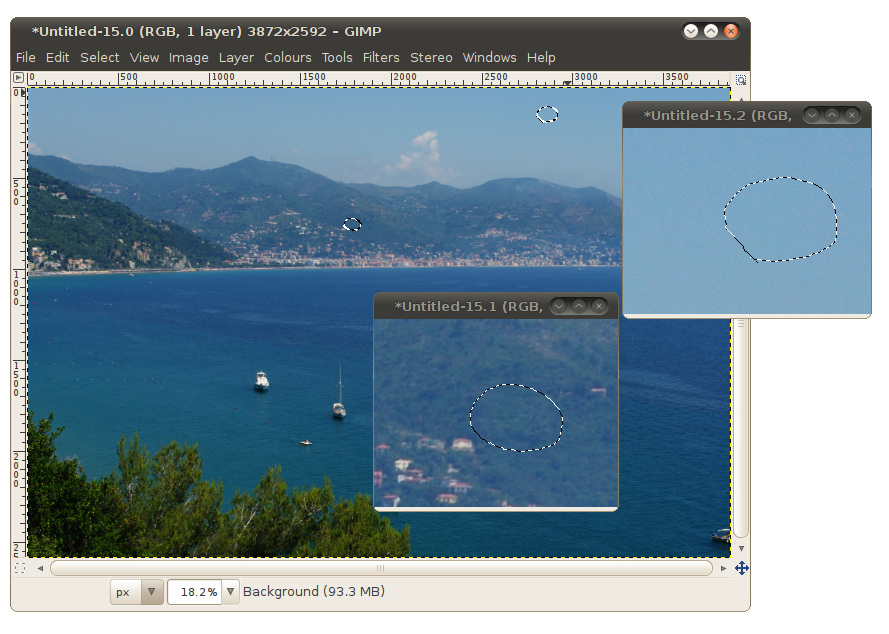
To clean dust spots, first find and select them. I usually use a free selection tool (Lasso). Press Shift to add more than one spot to selection. Select also a handful of “clean” pixels around. Which pixels are on the border of the selection matters.

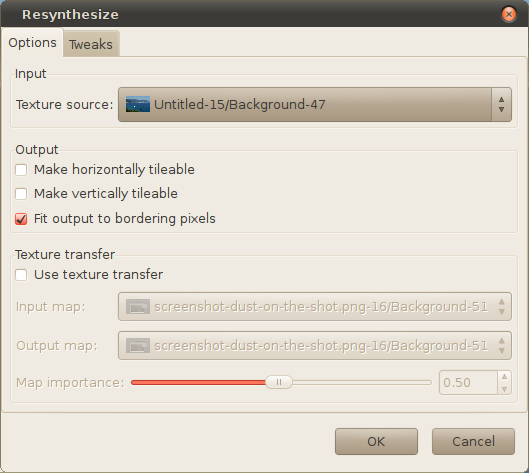
Run Filters -> Map -> Resynthesize filter. Default parameters should be OK, tiling options are not necessary for our scope.

Now you have to wait a few seconds. Resynthesizer takes some time to redraw the selection. Anyway, it is faster than manual clone brush.

Finally, inspect the result. Make sure that the plugin didn't draw anything strange. Usually it is OK from the first attempt:

Sensor dust removed with Resynthesizer

Enjoy!

And if useful, then  Flattr this

Riviera

Also in Russian: Удаление пыли на матрице в Gimp.

2010-07-21

.emacs of a Vim user

I've been using Emacs for few weeks now, and now I touch .emacs less and less often. Mostly I added alternatives to some Vim commands and defined more ergonomic keybindings. Here it is:

2010-07-07

The hierarchy of numeric typeclasses in Haskell

Some time ago I posted this in my Russian blog. Re-posting it here, for it's inconvenient to not be able to find it when googling in English. I use it for reference :-)

Haskell Numeric typeclasses

Non-abstract types are gathered together in gray frames. Polymorphic types and type classes have rounded boxes. Their possible type parameters are indicated with inversed rhombus arrows.

2010-06-28

Working AppEngine environment on Ubuntu Lucid

Ubuntu Lucid ships Python 2.6. Python 2.5 has been completely removed. Google AppEngine requires Python 2.5 to work. So if you want to develop AppEngine apps on a Lucid machine, you need to setup your working environment manually. This post tells how to do it.

(I assume you install Python to /opt/python2.5 and the user can write there; I assume you create a virtual environment, a directory where Python packages are installed, in $HOME/.py25. Choose different locations if you like and adjust instructions accordingly)

1. Get the latest Python 2.5 release and build it from source.

Make sure that you have necessary development libraries installed. In particular, you probably want to install libsqlite3-dev before building Python. Otherwise you'll have a Python without SQLite3 support, and GAE will not work with it.

Go to a directory where you build software and do from the command line:

wget  http://www.python.org/ftp/python/2.5.5/Python-2.5.5.tar.bz2 -O - | tar jx
cd Python-2.5.5
./configure --prefix=/opt/python2.5
make -j 2
make install
cd ..

If there are configure errors, likely missing packages or header files for C libraries, install them and repeat.

2. Get virtualenv and setup a new Python environment

You will use a separate Python environment for AppEngine. So you will not mess with system packages. Fetch and unpack virtualenv:

wget http://bitbucket.org/ianb/virtualenv/get/tip.gz -O - | tar zx

Run it to get a new environment in ~/.py25 (I use full path to the newly installed Python 2.5 here):

/opt/python2.5/bin/python virtualenv/virtualenv.py ~/.py25

Now to enable Python 2.5 you can source activate script from this environment, and to disable deactivate it:

$ which python ; python --version
/usr/bin/python
Python 2.6.5
$ source ~/.py25/bin/activate
(.py25)$ which python ; python --version
/home/sergey/.py25/bin/python
Python 2.5.5
(.py25)$ deactivate

To install packages for Python 2.5 you can use pip. For example, to install Python Imaging Library (PIL), which is used by AppEngine, run:

(.py25)$ pip install PIL

Or you can use -E ~/.py25 option of pip without activating the environment.

3. Run the development server

Put your GAE SDK in the PATH, get the source of the application, and run the server. For example:

(.py25)$ git clone http://github.com/anotherjesse/webpy-appengine-helloworld.git gae-hello
...
(.py25)$ cd gae-hello
...
(.py25)$ dev_appserver.py .
INFO     2010-06-28 16:35:04,755 appengine_rpc.py:159] Server: appengine.google.com
INFO     2010-06-28 16:35:04,761 appcfg.py:357] Checking for updates to the SDK.
INFO     2010-06-28 16:35:05,068 appcfg.py:371] The SDK is up to date.
INFO     2010-06-28 16:35:05,106 dev_appserver_main.py:431] Running application hello-webpy on port 8080: http://localhost:8080

2010-06-15

Network Management disabled

Sometimes (I suspect it happens after complete battery discharge and incorrect shutdown), my Ubuntu Lucid machine boots with networking disabled. This is a nasty bug, because it doesn't allow to google for solution.

The solution is

sudo sed -i 's/\(NetworkingEnabled=\).*/\1true/' /var/lib/NetworkManager/NetworkManager.state

and then

sudo service network-manager restart

https://bugs.launchpad.net/ubuntu/+bug/555571

OpenMP in the Multicore Era

Nice slides by Christian Terboven on “OpenMP in the Multicore Era”. Enough to get started.

http://www.autodiff.org/ad08/talks/ad08_terboven.pdf

By the way, to build an OpenMP program with modern GCC it’s enough to

gcc -fopenmp -o eval42 eval42.c

It should work out of the box. GCC 4.1 supports OpenMP 2.5, and GCC 4.4 supports OpenMP 3.0.

2010-06-14

Trying to do my daily tasks with Emacs

Lots of frustration, but I slowly remember some habits from 10 years ago. The thing I miss the most is ability to move quickly around and to delete/change an object of text, such as a word, a sentence, a paragraph, part of the line, a tag, etc. All those dsomething from vim.

Some command correspondence (beyond the crash course available elsewhere): (open table in a separate page)

It seems it's time to learn Emacs Lisp. I've bound toggle-viper-mode to C-<escape>. It's my preferred mode to move the cursor and delete stuff.

2009-09-04

Tag installed packages to delete later

One of the lesser known but very useful features of aptitude is user tags.

For example, someone wants to install a set of packages temporarily just to build some program from source. Later, when the -dev packages are not needed anymore, it is not easy to remember which packages were installed.

Fortunately, one may tag the packages during install (I use builddeps tag in the example below):

$ sudo aptitude install --add-user-tag builddeps \
      libsomething-dev libsomething-else-dev ...

Now when these packages are to be deleted, we just do:

$ sudo aptitude purge '?user-tag(builddeps)'

The search pattern ?user-tag(yourtag) can be used with any other aptitude search patterns. Also, you may tag packages during many other commands, not only install.

Tested in Debian Lenny (aptitude-0.4.11).

Прочесть по-русски.

2009-08-26

3 ways to re-indent XML

There is a lot of data in XML formats, but often it's hardly readable: written by programs for programs, everything in one line. Indenting XML automatically helps to read such files.

1. Using XSLT
I have a file with an XSL transformation:
<xsl:stylesheet version="1.0" 
   xmlns:xsl="http://www.w3.org/1999/XSL/Transform">
<xsl:output method="xml"/>
<xsl:param name="indent-increment" select="'   '" />

<xsl:template match="*">
   <xsl:param name="indent" select="'&#xA;'"/>

   <xsl:value-of select="$indent"/>
   <xsl:copy>
     <xsl:copy-of select="@*" />
     <xsl:apply-templates>
       <xsl:with-param name="indent"
            select="concat($indent, $indent-increment)"/>
     </xsl:apply-templates>
     <xsl:value-of select="$indent"/>
   </xsl:copy>
</xsl:template>

<xsl:template match="comment()|processing-instruction()">
   <xsl:copy />
</xsl:template>

<!-- WARNING: this is dangerous. Handle with care -->
<xsl:template match="text()[normalize-space(.)='']"/>

</xsl:stylesheet>
I found it here. There are also some other variants.

In addition to XSLT file, I have a one-line script which actually runs this transformation. I use xmlstarlet, which is a nice CLI utility to deal with XML.

#!/bin/sh
xmlstarlet tr ~/bin/indent-xml.xsl
Run this script as:
$ xmlindent < original.xml
Along with xmlstarlet you can use other XSL processors. For example, xsltproc should work too.
2. Using xmllint
Inside libxml2-utils package (Debian/Ubuntu) there is an XML validator tool xmllint. It can also reformat (indent) XML:
$ xmllint --format original.xml
This must be even easier.
3. xmlindent
xmlindent is a pure C utility with almost no dependencies. It is intended to do just what it is named: indent XML. I didn't try it.

Прочесть по-русски

Monitor file changes in a shell script

Problem: monitor file changes from a shell script and execute some commands when necessary. For example, rebuild LaTeX document or compile program every time when one of its source files is changed.

Solution: inotify-tools help to monitor file changes. There are two utilities. The first one, inotifywait, blocks and waits for changes, then returns. If the event it was waiting for happened, its return code is 0 (success). See an example of using inotifywait below. The second utility is inotifywatch, it monitors files' changes, collects information and prints a nice table on exit. Please visit inotify-tools' site to see examples of its use.

Example: inotifywait monitors all *.tex and *.bib files in the current directory, and when any of them changes, it runs pdfLaTeX and BibTeX to rebuild document:

while true ; do \
  inotifywait *.tex *.bib \
  && ( pdflatex -interaction=nonstopmode mypaper && \
       bibtex mypaper && \
       pdflatex -interaction=nonstopmode mypaper ) \
done

P.S. Please note that when we run LaTeX with -interaction=nonstopmode, it does not ask questions on errors but we can still see those errors.

P.P.S. inotify-tools run only on Linux. You may need to use pnotify or kqueue on *BSD.

Прочесть по-русски

2009-06-15

Haskell horrors

As a beginner Haskell programmer I still remember its horrors. Time to write them down. It is my first functional language, so I have to learn new concepts and new language in parallel, but it is fun. I hope these notes may be useful to other beginners. I'll give also some examples in Python, to show that Haskell in fact is not so scary for beginners.

1. Lambdas

We call it lembas or waybread, and it is more strengthening than any food by men, by all accounts…

This is why I learned about Haskell. I was just curious what those lambdas are. A paper Conception, evolution, and application of functional programming languages by Paul Hudak was really helpful to get started (It's kind of old, and, probably, there are better introductions, but I read this one first).

Lambda expression is an essence of ‘function’: it's an expression of form

\lambda x \;.\; \text{expression with $x$}

The value of this expression is a function, which takes one argument (x) and calculates something with it (an expression on the right hand side of the dot). There is much mathematical theory about lambdas, but sometimes I just think about \lambda as a keyword to define functions. In fact, I was already used to lambdas in Python, where they look like:

lambda x: expression with x

They were very useful in filter() and reduce(). They may be used almost anywhere where a function name is required, but lambdas don't have names. Hence, they are called Anonymous functions.

Sometimes in Python I give them names to define new functions on-the-fly

add_42 = lambda x: x + 42

Name add_42 now refers to a function. This is almost the same as defining functions in a more usual way:

def add_42(x):
    return x+42

Now, what about Haskell? It's pretty much the same. \ symbol stays for \lambda, -> stays for dot:

\x -> expression with x

We can even give them names to define reusable functions:

add_42 = \x -> x + 42

Very similar, isn't it?

There is a subtle point. As soon as I started reading about Haskell, I saw lambda-expressions which looked a little bit strange at first:

\x -> \y -> an expression with x and y

What are those multiple ‘arrows’ I asked? The answer was really simple and very helpful to understand Haskell code.

All Haskell functions are functions of one argument. This may sound like a restriction initially, but then it turns out to be a very convenient concept. A function of n arguments may be represented as a function of one argument producing another function of n–1 arguments. This is called currying.

Once we know this, we can read any expression with many arrows:

\x -> (\y -> an expression with x and y)

The value of the expression is a function which takes an argument and produces another function which takes yet another argument. This expression as a whole behaves as if it were a function of two arguments. For example, we may apply such a function to two arguments in ghci (Haskell interpreter):

ghci> (\x -> \y -> x + y ) 3 4
7
Of course, there is a shorthand form where we can write it as a function of two arguments (please note also that we don't need parentheses for function arguments):
ghci> (\x y -> x + y) 3 4
7

But it is very useful to know that internally every function of two or more arguments is actually a function of only one argument. This also helps reading function types later. For example, a type of map function reads like

map :: (a -> b) -> [a] -> [b]

I usually read it like this: ‘function map takes two arguments, a function from a to b and a list of a and produces a list of b’. But sometimes it is more natural to read as written:

map :: (a -> b) -> ([a] -> [b])

‘A function which takes a function from a to b and produces a function which converts a list of a to a list of b’.

These simple ideas about lambda functions were enough to get me started with Haskell and to understand most of the examples and tutorials.

2. Equals sign

‘If there's no meaning in it,’ said the King, ‘that saves a world of trouble, you know, as we needn't try to find any. And yet I don't know,’

As for me, equals sign = was probably the most important Haskell symbol to understand the language. I think its semantics is underemphasized in tutorials. For example, it's the only ‘keyword’ which is missing on a Haskell keywords' wikipage.

Unlike in most imperative languages where = means an assignemt (i.e. an action), in Haskell it means that its left hand side equals its right hand side.

‘Equals’ is not ‘becomes’. It means that something is equal to something else. Always. Just like in mathematics. a = b in Haskell means that a equals b by definition, a is equivalent to b.

So, = in Haskell serves to write definitions. It defines all sorts of things, but it defines them statically. It doesn't depend on the order of execution. It is something we may rely upon.

This may sound too evident, but this is a major difference for anyone with an imperative background. Now we may give names to our anonymous functions:

add = \x -> \y -> x + y
To tell the truth, it's not very readable, so most of the time functions are defined like this:
add x y = x + y
But this one is still a definition of add.

3. Type classes

Significant benefits arise from sharing a common type system, a common toolset, and so forth. These technical advantages translate into important practical benefits such as enabling groups with moderately differing needs to share a language rather than having to apply a number of specialized languages. — Bjarne Stroustrup
Type system in Haskell is beatiful. It feels very natural to reason about. And probably type classes is the least alien concept for people coming to Haskell from procedural/OO world. At least they are for me. But type classes are not the same thing as classes in C++ or Java. They are much more like abstract template classes in C++, because they
  • define only an abstract interface (don't provide a default implementation)
  • allow independent implementations (that is any class may become an instance of the type class if it implements class methods)
  • are polymorphic by their nature and support inheritance
  • don't have state variables
Once it's accepted that type classes are not C++ classes, but abstract interfaces, and class instances are not “objects”, but implementations of the abstract interfaces, Haskell becomes friendly and easy. I suggest to read an excellent a wiki article OOP vs type classes which covers this topic in much more detail.

4. Monads

And as every present state of a simple substance is naturally a consequence of its preceding state, so its present is pregnant with its future.

Now matter how gentle your introduction to Haskell is, sooner or later you stumble into the wall of Monads. Yes, there is some serious abstract mathematics behind them.

But I learned that it is not necessary to understand abstract mathematics to use monads, and they are indeed a very nice programming technique. They looked a little bit strange to me initially, but understanding monads is easier than memorizing countless OO design-patterns and using them right.

There are plenty of tutorials on monads, so I wont repeat them and expect that you've already read one or two. So, what's wrong with monads? For my imperatively prepared mind spoiled with years of object oriented thinking, monads looked strange. They may look like an abstract container class with a mystic >>= method:

class Monad m where
  return :: a -> m a
  (>>=) :: m a -> (a -> m b) -> m b
  fail :: String -> m a
Well, if return is a constructor, then why such a strange name? If this is a container class, how can I take values out? And what's the point of applying a function inside monad (>>= method, also known as bind) if we cannot take the result out of it?

Let's answer the last question first. What is the purpose of bind (>>=)? Monads are and are not containers. They are wrappers around computations rather than values (return). But they wrap computations not to store them conveniently in monadic boxes, but to link them together. Think standard bricks rather than boxes, or Adapter pattern. Each monad defines a standard interface to pass the result from one computation to the other (>>=). No matter what happens, the result is still in the same monad (even fail).

The most simple programming analogy I found is pipes in unix shell. Monads provide a unidirectional pipeline for computations. The same unix pipes do. For example:

$ seq 1 5 | awk '{print $1 " " $1*$1*$1 ;}'
1 1
2 8
3 27
4 64
5 125

seq produced a list of integers. awk calculated cubes for all of them. What's cool about this? We have two loosely coupled programs which work together. Text stream flows from left to write, each subsequent program in a pipe is capable to read this stream, do something with it, and output another text stream. Text stream is a common computation result, | binds computations together.

Monads are similar. >>= takes the inner computation from the monad on the left and puts it into the computation on the right, which always produces the same monad. You probably already know that lists and Maybe type in Haskell are monads. For example, if we have a simple computation which returns a pair of a number and its cube into the monad:

\x -> return (x, x^3)

then we can ‘pipe’ the list into this computation:

ghci> [1,2,3,4,5] >>= \x -> return (x,x^3)
[(1,1),(2,8),(3,27),(4,64),(5,125)]

Please note that we received a list of pairs. It's the same monad (the list). But if we ‘pipe’ a Maybe value into the same computation, we get the same monad as input (Maybe):

ghci> Just 5 >>= \x -> return (x,x^3)
Just (5,125)

You see, we can construct a pipeline of two computations, and the behaviour of this pipeline depends on the context (i.e. on the Monad instance), not on the computations themselves. Unlike unix pipes, Monads are type-safe, type system takes care that the output of one monadic computation is compatible with the input of the other. And unlike unix pipes, we can define our own binding rules (>>=). Like ‘don't join more than 42 computations in a row’ or ‘look at the input, and do one thing or the other’. Monads encapsulate rules how to bind computations together.

Now, I hope, you understand monads at least as well as I do (not necessarily perfectly). I'd like to discuss some mnemonics. Why return is named ‘return’?

In most languages, return returns result from a function. In Haskell, it acts as constructor for monads. Weird. Well, let's look at how >>= works, we see that it extracts a value from the monad on the left, and then binds it to the argument of the function on the right. This function should return the result back into monad, so that the next >>= can work. This is the first mnemonics.

The second mnemonics. On the top level any Haskell program is executed in IO monad (main's type is IO ()), which can do input/output (and sequential operations in general). Thus, monadic code is executed on the top level and it calls any pure code when necessary, not otherwise. So any pure value if not discarded is eventually returned into the monad of the caller.

With these two explanations the name return does not sound so weird for me as before. I don't pretend these explanations are technically correct.

The next question, how to take a value of the computation out of the monad? Well, it's not always possible by design. For example, you cannot take a pure value outside of the IO monad. If we have such a one-way monad, the only thing we can do, is pipeline the value to the next computation. Fortunately, Haskell has a nice do-notation, which makes such pipelining look almost identical to imperative programming languages. These two programs describe the same thing, with do-notation:

main :: IO ()
main = do
  name <- getLine
  putStrLn ("Hi, " ++ name)
and with explicit >>=:
main :: IO ()
main = getLine >>= \name -> putStrLn ("Hi, " ++ name)
An equivalent Python program:
from sys import stdin, stdout
if __name__ == "__main__":
    name = stdin.readline()
    stdout.write("Hi, " + name)
However, sometimes it is possible to take the pure value out of the monadic computation. This is not possible with the standard monad interface, so the developer of the monad should provide means to extract values. For example, it is possible to extract values from Maybe monad using fromMaybe function:
ghci> fromMaybe 0 $ Just 3
3
ghci> fromMaybe 0 $ Nothing
0

Résumé on monads

So, bind (>>=) allows to put various monadic computations together and combine them. Anywhere, where we have a chain of computation, monads fit naturally. Particular monad implementation may encapsulate custom rules of combining two computations together. Name return may be confusing for beginners, but we have to remember that it returns a value into the monad, not from the monad. Understanding this helped me a lot.

5. Scary words

I know nothing except the fact of my ignorance.
Finally, I have to acknowledge, after months of studying Haskell and being able to write useful programs in it, there is still a lot of concepts in the Haskell world which I don't know anything about or have only a vague idea. I call these kind of concepts “scary words”. But still I see people creating and using new libraries which implement those concepts. Let's face it: Haskell remains a test bed for research. It's both good and bad. It's good, because it feels like a bleeding edge is really close, and you may benefits from the new approaches if you like. And it's bad, because if you want to use some cool new library, you may find that it heavily relies on a concept you are not very comfortable with. For example, there is a modern XML library, HXT. It uses arrows heavily. Arrows provide more general combinators than monads, but it took me much more than a day to understand them. Strictly speaking, Arrows are not part of the language, but they are an actively used concept in practice. There are many other examples like this. I think that it's important not to be afraid of the “scary words”. Fortunately, all the concepts are well documented. There are papers which explain the ideas. Personally I decided to learn such concepts as need arise. At least it promises to be manageable and entertaining.

Conclusion

I mentioned 5 simple ideas which helped me to get used to Haskell: lambdas are just a way to write functions, a function of two or more arguments is actually a function of only one argument which returns another function, type classes correspond to abstract polymorphic interfaces in the object oriented wold, monads are just a tool to merge computations together, and scary words are just scary words. I hope this helps someone else. This post is also available in Russian.