2011-03-09

How to choose a Haskell array library

Choosing an array type in Haskell is a difficult task. For one-dimensional random access data structure the vector library seems to be the optimal choice most of the time. Things are more complicated if you happen to need two- or multi-dimensional arrays (matrices), access their blocks and slices as first-class structures (like in Python), enjoy destructive updates, use some linear algebra, interoperate with C and run your code in parallel...

I've reviewed what array libraries are available on Hackage, and compiled this feature matrix.

It is not complete and not finished, please let me know if I am mistaken about some of the libraries.

Data.Array and its variants from the array library seem to be the standard choice of multi-dimensional arrays for a Haskeller. They are not good anymore when you need to write array-to-array operations, access their blocks and slices, or need some linear algebra in general. Choosing the right variant is another question.

Data.Vector from the vector library is fast and has very nice API. It is going to become part of the Haskell Platform. Unfortunately, it is not usable for multi-dimensional arrays, and it doesn't support slices (strides). Only boxed variant is parallelizable.

Data.Packed.Vector and Data.Packed.Matrix from the hmatrix library provide a very nice API, and can do almost anything, if all you need is at most two-dimensional array (a matrix). A big warning sign: hmatrix is GPL. Not a sensible LGPL, but the poisonous GPL library. Also, Data.Packed.Vector and Data.Packed.Matrix are not parallelizable as far as I can see.

Data.Vector.*, Data.Matrix.* and Data.Tensor.* from the blas library. They can do all the standard linear algebra which the BLAS level 3 can offer. Their API is designed with BLAS API in mind. I didn't check if they are interoperable with C arrays, or if the elements are unboxed, or if the operations are parallelizable. The last release was in January 2009, it is not buildable on new GHC 7 yet.

Finally, there is new Data.Array.Repa arrays from the repa library. Nice thing about them: they are designed for parallelization. Not so nice thing about them: they don't give performance advantages on GHC 6, and are not yet buildable on GHC 7. Some more important limitations of the repa: no access to strides or array blocks, no built-in linear algebra, no interoperability with C.

I didn't include in the table Vec and vect libraries, which provide special case solutions in the low-dimension arrays and low-rank matrices. They are mostly tailored towards computer graphics.

2011-01-24

Pro Git book in ePub

I've followed Pandoc instructions, and built a e-book version of Pro Git book by Scott Chacon. If you do not want to repeat these steps yourself, you can download the result:

Scott Chacon. Pro Git. [EPUB]

Scott Chacon. Pro Git. [EPUB] (alternative link)

P.S. The author kindly asks to purchase a paper version of the book to encourage more authors and publishers to use Creative Commons licenses.

2010-11-25

Unplot.py: from plots to tabular data

Recently, when doing backups, I noticed a script on my hard drive, which I think may be useful to someone else. It takes an image with a line plot and generates a data file for that plot. So it does an operation inverse to plotting, i.e. unplotting.

Download: unplot.py.

The script is available on bitbucket. Feel free to improve.

To run the script, you first need to decide which part of the plot image you want to scan, and what values the pixels correspond to. I prefer to use Gimp or Geeqie to find pixel coordinates.

If there are many lines on the same plot, You may also decide to colourize the line you are interested in with some distinct colour. Use Gimp if necessary. Write down the colour's HTML code.

This plot is a good point to start:

colourized plot

Then you can run the script against it. In the directory with the script, run:

./unplot.py "#00ff00" 0 151 0 475 5.0 824 0.09 85 /path/to/plot.png > /path/to/data.txt

The first parameter is the HTML colour code of the line to select. Then there is the values and the pixel coordinate of the bottom left corner of the plot: X value, X pixel coordinate, Y value, Y pixel coordinate. Then the same for the top right angle. And finally the name of the file with the plot. The output is redirected to the text file. Please note that the origin of digital images is usually the top left corner.

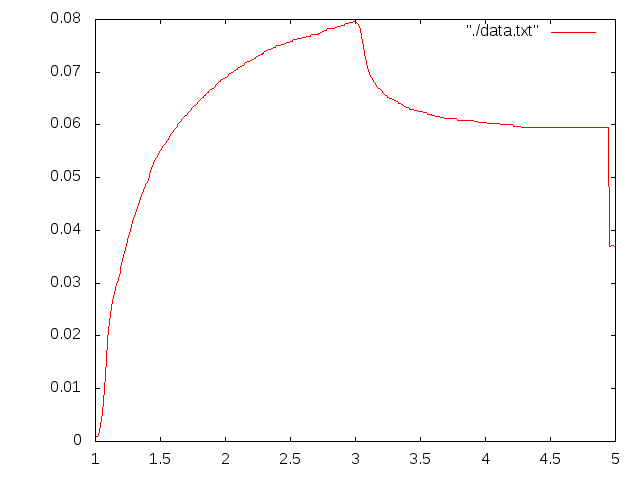
After running the script try plotting the data once again to make sure you selected the right colour and region. I went too far to the right in this example and the green letters were mistaken for the part of the plot.

In Russian: unplot.py: извлекаем табличные данные из графиков.

2010-11-11

How to select a region by intensity range in Gimp?

I wrote this as an answer to Photo.StackExchange question, how to select by histogram range in Gimp.

Step-by-step

  1. Make a copy of the layer (Layer → Duplicate Layer)
  2. Select the duplicate layer, apply threshold (Colors → Threshold) to select the range of intensities.
  3. In Layer → Mask → Add Layer Mask (or right click in the list of layers). Select “Grayscale copy of layer” and “Invert mask”.
  4. idem: Mask to selection.
  5. Hide or remove the layer with mask.

An example:

An original image. I want to select the circle:

Original image

Make a copy of the layer:

Duplicate layer

Apply threshold. Note that the area to be selected is black:

Threshold

Add Layer Mask using the grayscale value of the image:

Add Layer Mask

Now you've obtained an image with the mask. Everything except the black circle is transparent (we can see the bottom layer through it):

Image with the mask

Convert the mask to selection. Switch to the original layer. The circle is selected.

Mask to selection

2010-09-14

JavaScript highlighter for Haskell code

In this and in my other Blogspot blog I use SHJS to highlight syntax in Haskell snippets. SHJS is a JavaScript highlighter which uses language definitions from GNU Source-highlight.

To use it, you need to put online:

You may wish to download more than one language definition and concatenate all JavaScript files together. It's OK

Then put this somewhere in the <head>:

<head>
...
<script type="text/javascript" src="http://example.com/path/to/sh_main.min.js"></script>
<script type="text/javascript" src="http://example.com/path/to/sh_haskell.min.js"></script>
<link type="text/css" rel="stylesheet" href="http://example.com/path/to/stylesheet.css">
...
</head>

And add a callback to documents' body element:

<body onload="sh_highlightDocument();">

Finally, wrap your Haskell snippets with <pre class="sh_haskell"></pre>. This is how it looks:

-- Fibonacci numbers
fibs :: [Int]
fibs = 0 : 1 : zipWith (+) fibs (tail fibs)

As far as I know, Haskell language definition has already found its way to GNU Source-highlight, but the corresponding file is not yet shipped with SHJS. So you can download it either from my source repository, or generate from the language definition file (haskell.lang) yourself.

Haskell is a quirky language to highlight, but this language definition handles it reasonably well, better than the current google-code-prettify, and much better than the current GeSHi highlighter.

Update, 2011-01-25: Suprisingly, this highlighter is still better than more recent highlight.js and an alternative language definition for SHJS by Nicolas Wu (zenzike).

So this is the complete list of JavaScript highlighters for Haskell which I know about:

Typography keyboard layout in Linux

From a Russian blog Slovomania I learned that in the new versions of X11 there is a typography layout option, similar to Ilya Birman layout. This is its Linux counterpart:

Typography layout in Linux

To enable it in GNOME: System → Preferences → Keyboard. Then Layouts tab, Options.... Enable Key to choose 3rd level (right Alt will do) and Enable extra typographic characters under Miscellaneous compatibility options.

Also in Russian: Типографская раскладка в Линуксе.

2010-09-04

LibZip 0.1: read and write zip archives from Haskell

I am happy to present a major release of my Haskell bindings to libzip library, to manipulate zip archives. It took me longer than I initially expected, but finally I like the result. Essential links first:

Hackage page Source repository Documentation Test coverage report An example

What's new

LibZip 0.1 is a complete remake. Under the hood it was made with bindings-DSL instead of C2Hs as before. The new LibZip offers a lot:

  • Support of almost all features of libzip: creating, reading, updating, renaming, and deleting files in zip archives, reading and writing file and archive comments. (LibZip 0.0 was read-only)
  • Support of various data sources: supply contents of a file from a list, from a file on disk, from a file in another archive, or even from a Haskell function.
  • A new monadic interface. It takes care of managing handlers and pointers behind the scenes. Less to type, less space for a user error.
  • Unit tests, better documentation and examples.

LibZip the only non-GPL library for Haskell to deal with zip archives. It is also fast to deal with large on-disk archives (more about it below).

Users of LibZip 0.0 (all 1.5 of them) may still use the old API by importing Codec.Archive.LibZip.LegacyZeroZero instead of Codec.Archive.LibZip. However, the old API is deprecated and will not be supported in the future.

LibZip vs zip-archive

There is another Haskell library to deal with zip archives, namely zip-archive. And here are the differences:

LibZip 0.1/libzipZip-Archive 0.1
LicenseBSDGPL v.2
Pure?NoYes
Large on-disk archivesFastSlow

Few notes about the last line. This is the actual reason why LibZip exists. Zip-archive was unacceptably memory-hungry and slow when dealing with large archives. So I started working on LibZip. I suppose that the problem with zip-archive is that it works with lazy bytestrings, not files. Bytestrings are sequential and don't have fseek. There is no reliable way to implement random access.

To get an idea what's the problem, get some moderately sized zip-archive off the web (for example, this one, 22 MiB), and print the list of files using both libraries.

With zip-archive, I used this code:

import Codec.Archive.Zip
import Control.Monad (liftM)
import System.Environment (getArgs)
import qualified Data.ByteString.Lazy as BS

main = mapM_ list =<< getArgs

list file = do
  a <- toArchive `liftM` BS.readFile file
  mapM_ print $ filesInArchive a

On my laptop, it takes 3.5 seconds to run against the downloaded archive:

$ time ./zip-archive-ls pak128-1.4.6--102.2.zip > /dev/null

real 0m3.499s
user 0m3.430s
sys 0m0.050s

And this is the code using LibZip:

import Codec.Archive.LibZip
import System.Environment (getArgs)

main = mapM_ list =<< getArgs

list file =
    withArchive [] file $ do
      names <- fileNames []
      lift $ mapM_ print names

It takes 0.05  seconds on the same file:

$ time ./libzip-ls pak128-1.4.6--102.2.zip > /dev/null

real 0m0.051s
user 0m0.040s
sys 0m0.010s

The difference gets more dramatic as the size of the archive increases. So, in my opinion, license issues aside, LibZip is a better choice when dealing with large archives on disk. Zip-archive may be more suitable choice to generate small archives in memory, without even hitting the disk.

Some implementation notes

I switched from C2Hs to bindings-DSL to implement the FFI bindings. And actually I liked bindings-DSL more. It is simple and makes fewer assumptions about the semantics of the C code. As a result, I had working low-level bindings very early. The rest was just to wrap them with a higher-level API to my liking. C2Hs experience was less smooth: in particular, when a C function is not designed as C2Hs expects it, I had to write wrappers manually anyway (for example, if a function returns a value and writes something to memory). Bindings-DSL seems to be better supported right now.

I changed the order of file names and file access flags in all API functions. File name being the last seems to be more useful for partial function application. An example of such order of arguments is:

fileSize :: [FileFlag] -> FilePath -> Archive Int

I ditched ByteString support from the new API. ByteStrings are my Haskell nightmare: there are too many flavours of them to support, and they are not interchangeable. With LibZip 0.0 I had to support two versions of otherwise identical code, all to discover some time later that I need to pack . unpack bytestrings in the application code (impendance mismatch with another library, which chose to use a different flavour of bytestrings).

In this version I chose to use lists as input and output buffers to some functions (sourceBuffer, sourcePure, readBytes, readContents). I suspect this may have negative performance impact, but it needs to be studied. Marshalling of the byte buffers is another question. I suppose that sourceFile and sourcePure may help to workaround this problem if it actually arises. User feedback is required.

Some of the library functions (most notably sourceBuffer) accept Strings as data buffers. This is convenient for testing, but those Strings should not contains code points above 255. The library doesn't handle text encodings. The user is responsible of providing a correctly encoded byte stream to the library.

Libzip can use C callbacks as data source. LibZip bindings can wrap a pure Haskell function and make the C library call it when necessary (see sourcePure). It is not as convenient as the usual lazy evaluation in Haskell, but, hopefully, may somewhat compensate for impurity of the library. I consider adding also sourceIO.

Thanks?

LibZip is under BSD3 licencse. So it is Free. If you want to say “thanks”, consider using this Flattr button:

Flattr this

I think Flattr is a great idea and I'll be glad if more people start using it.

If you use the library, please let me know. It will make me happier, and will motivate me more to support and improve the library.